Support the Blog!

vudu.com
Showing posts with label Soundprism. Show all posts

Monday, September 5, 2011

The Future of Music Creation on the iPad

There are a lot of exciting developments occurring in the world of iOS music creation. Today I wanted to share my thoughts on those developments and what I believe the future holds for iOS musicians.

As a long-time home recording enthusiast, I was excited by the possibilities of music creation on the iPad. The implementation of core-midi opened up new opportunities for creating music with the iPad including using external hardware or linking two iOS devices through MIDI as I laid out in this tutorial: Connecting Your iPad to Your iPhone with MIDI.

Core MIDI Grows Up
A big breakthrough came in April when the Modrum app released an update supporting "virtual" ports. While initially this port sharing was limited to Bassline and Funkbox, there was clearly potential for MIDI sharing between all midi capable apps.

With a little experimenting, I found other apps capable of port sharing including iElectribe and Music Studio as seen here: Funkbox Tutorial. This port sharing it turns out was just the implementation of iOS Core Midi with multitasking. It was only a matter of time before other developers got onboard with virtual ports and we would be able to chain our favorite apps together through MIDI.

That day is here. Within the next month we will see new releases from music apps such as Polychord, Nlog Synth, Soundprism, and Sunrizer that will allow unprecedented MIDI sharing between apps. You will now be able to use Polychord or Soundprism in the foreground to play other instrument apps residing in the background such as Nlog Synth, Sunrizer, and Modrum.

polychord & Sunrizer (BETA) playing together from Shoulda Woulda Coulda on Vimeo.


But that is only half the story...

Rise of the Tabletop Apps
Over the summer another equally game changing event occurred: the release of the tabletop music apps Rhythm Studio and Tabletop. Visually these apps look like a musician's desk with multiple studio devices linked together. Instead of connecting to other apps through midi, these apps attempt to bring the capabilities of multiple apps together under one interface.

What separates the tabletop apps from other sequencers like Nanostudio is their modular approach to music creation. The drums, synths, effects, and mixers are all treated as separate modules. The flexibility of this design means that modules can be updated and added upon indefinitely. 3rd party developers could conceivably develop new modules for the tabletop as well.


These tabletop apps could accomplish the same results as a chain of apps joined together through midi without the need for app switching. In addition, the tabletop apps can record their chain of modules and export the results to audio. This is something midi port sharing has yet to accomplish, although to succeed on it's own merits, it will ultimately have to tackle.

There Will Be Convergence
I believe that these two revolutions playing out on our iPads are heading for convergence. The reason is simple: the modular design and the sequencing capabilities of the tabletop apps make them ideal for triggering music apps in the background. The background apps themselves can be treated simply as additional modules that just happen to reside outside the tabletop. The background apps would essentially be treated just like Rewired apps do today on our desktop DAWs.

Only time will tell if I'm right. Regardless of the outcome, it will no doubt be an exciting future for iOS musicians.

-Milo

Now that you've heard my thoughts. I'd love to hear your's. Leave a comment and let me know where you see iOS music going.


- Posted using BlogPress from my iPad

Saturday, April 30, 2011

ipad and iPhone together again via Midi

In today's tutorial, I show you how to share a Midi connection between your iPhone and iPad allowing you to play Nanostudio or Music Studio on the iPhone using Soundprism on the iPad.


Build your own Midi link:


Apps Mentioned:

Saturday, April 16, 2011

Rockin' the Soundprism


Skill: Easy Peasy
Hassle: About as little as you can have on the iPad

Ok, one may never "rock" with the Soundprism app but it is a great way to generate song ideas and for some, it may be an end in itself. The app only has 3 tones in its banks, but there's enough charm in those tones to create some nicely textured music. The app has even been used to create video game and movie soundtracks.

There are a lot of music apps out there but the selling point with Soundprism is it's easy to use interface. Anyone can pick it up and make music instantly. In fact you can't play a wrong note. In today's blog, I'm going to break down the secrets behind the mysterious interface and show you how to get the most out of the app.

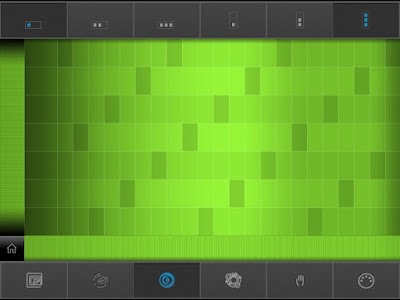
When you first open the app, you're greeted with a simple interface. There's no sign that it's even a music app.


But just touch anywhere within the grid and chords and bass notes meld together in a synthesized symphony.

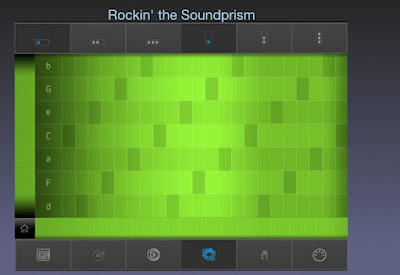
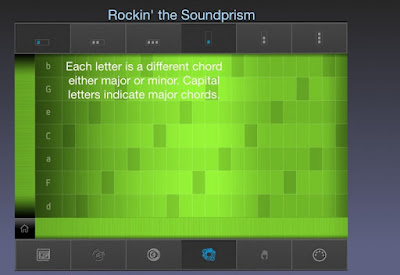
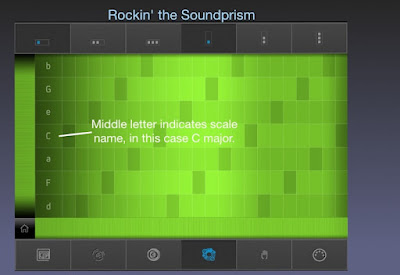
The first thing we want to do is turn the Pitch Labels switch to on. The settings are located by tapping the "Home" button in the bottom left. Once set to on, you will see a series of letters to the left of the grid. These are the chord names.


The capitalized letters represent the major chords while the small letters represent the minor chords. Tapping these letters will play a bass note. Tapping the grid to the right will play chords made from the neighboring notes.


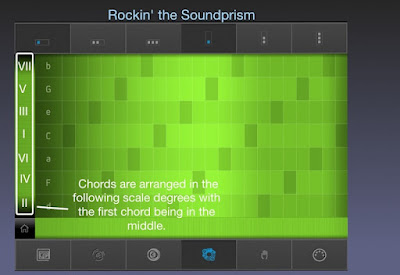
There are 7 chords, one for every note in the scale. The chord in the middle represents the root chord or first note of the scale. This will also be the key the notes of the grid will belong to. By swiping the strip to the left of the notes, you can scroll to another key.


As you can see, the chords are not lined up in sequence but alternate in thirds. These "stacked thirds" form the basis for harmony in Western music. Restricting the grid to only the chords made up from the selected scale ensures that every combination of notes will mesh well together.


Now that you know the chord sequences, you can apply chord some popular chord progressions in your compositions. Here's a few you can try:

I, IV, V Progression
The most popular sequence in rock music. Used in everything from Johnny B. Goode to Hey Jude to well everything. Using the guide pictured above, you would play this progression by tapping C F and G in sequence.

I, VIm, IV, V Progression
Another staple of rock music.

I, IV, IIm, V

The chord progression from "American Pie" when played in the key of G.

Im, bVII, bVI, bVII
You may have noticed that Soundprism doesn't allow you to select minor chords as the root. For this minor sequence, you will need to scroll the grid to a place where the minor chord is in the position below the root note. For A minor the root will be C. This will allow you to play the sequence Am, G, F, G. Sound familiar? These are the chords behind Jimi Hendrix's cover of "All Along the Watchtower."


There a ton of possibilities once you understand the engine that's under the Soundprism hood. I will cover more on chord progressions in a later blog including how to build your own. But this is enough to get your feet wet.  If you come up with something good, share it in the comments below.  Now go be awesome.
-Milo

Sound prism is a free app available on the iPhone and iPad.


- Posted using BlogPress from my iPad
Location:Texas