
Skill: Easy Peasy
Hassle: About as little as you can have on the iPad
Ok, one may never "rock" with the Soundprism app but it is a great way to generate song ideas and for some, it may be an end in itself. The app only has 3 tones in its banks, but there's enough charm in those tones to create some nicely textured music. The app has even been used to create video game and movie soundtracks.
There are a lot of music apps out there but the selling point with Soundprism is it's easy to use interface. Anyone can pick it up and make music instantly. In fact you can't play a wrong note. In today's blog, I'm going to break down the secrets behind the mysterious interface and show you how to get the most out of the app.
When you first open the app, you're greeted with a simple interface. There's no sign that it's even a music app.
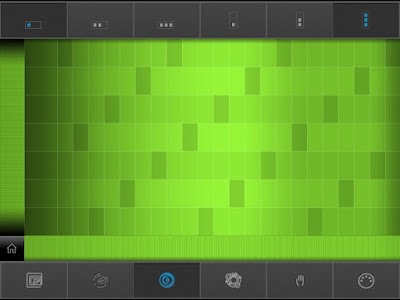
But just touch anywhere within the grid and chords and bass notes meld together in a synthesized symphony.
The first thing we want to do is turn the Pitch Labels switch to on. The settings are located by tapping the "Home" button in the bottom left. Once set to on, you will see a series of letters to the left of the grid. These are the chord names.
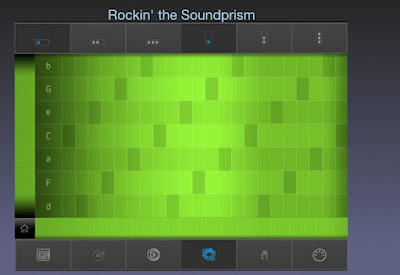
The capitalized letters represent the major chords while the small letters represent the minor chords. Tapping these letters will play a bass note. Tapping the grid to the right will play chords made from the neighboring notes.
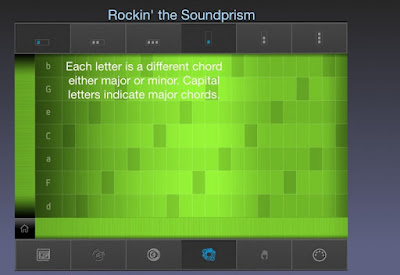
There are 7 chords, one for every note in the scale. The chord in the middle represents the root chord or first note of the scale. This will also be the key the notes of the grid will belong to. By swiping the strip to the left of the notes, you can scroll to another key.
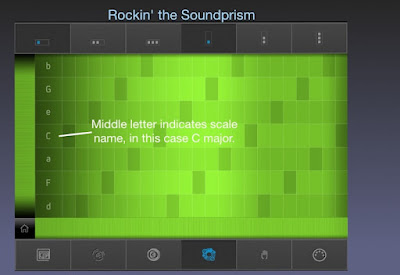
As you can see, the chords are not lined up in sequence but alternate in thirds. These "stacked thirds" form the basis for harmony in Western music. Restricting the grid to only the chords made up from the selected scale ensures that every combination of notes will mesh well together.
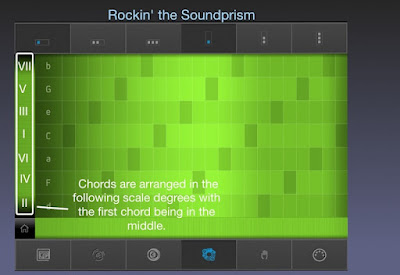
Now that you know the chord sequences, you can apply chord some popular chord progressions in your compositions. Here's a few you can try:
I, IV, V Progression
The most popular sequence in rock music. Used in everything from Johnny B. Goode to Hey Jude to well everything. Using the guide pictured above, you would play this progression by tapping C F and G in sequence.
I, VIm, IV, V Progression
Another staple of rock music.
I, IV, IIm, V
The chord progression from "American Pie" when played in the key of G.
Im, bVII, bVI, bVII
You may have noticed that Soundprism doesn't allow you to select minor chords as the root. For this minor sequence, you will need to scroll the grid to a place where the minor chord is in the position below the root note. For A minor the root will be C. This will allow you to play the sequence Am, G, F, G. Sound familiar? These are the chords behind Jimi Hendrix's cover of "All Along the Watchtower."
There a ton of possibilities once you understand the engine that's under the Soundprism hood. I will cover more on chord progressions in a later blog including how to build your own. But this is enough to get your feet wet. If you come up with something good, share it in the comments below. Now go be awesome.
-Milo
Sound prism is a free app available on the iPhone and iPad.
- Posted using BlogPress from my iPad


